Showing posts with label Free. Show all posts

Monday, July 30, 2012

Shape Gestures

Here I am, again, facilitating another session of core academy in Monticello, Utah. Don't worry, I haven't forgotten to share what I have learned. I wanted to finish this session before I did, because I didn't want to possibly miss out on something wonderful here.

Here is something that a core facilitator picked up at the session in Logan and she wanted me to post it on the blog. If this is your creation please let me know so I can give you credit.

Some of the gestures I don't quite know what they mean, but I have enough of an idea that I can make this work for me.
Click here for a copy.


Enjoy!


Tuesday, July 17, 2012

Magic Numbers

Here is a gem I picked up from a friend I made while facilitating core academy this summer. I have seen it before, but obviously I didn't remember long enough to actually use it this summer.
Click here.

I call it "Magic Numbers," because it makes me look really smart. Almost "magically" smart. My friend does this with her first graders, telling them that if they come on the last day of school she will share the "secret" of how it works.

Luckily for you, you won't have to wait until the last day of school to find out how it works.

Wait - maybe I could string you along for awhile and not share the secret for a bit.

Have your students choose any number between 1 and 31. DON'T LET THEM TELL YOU THE NUMBER, but they need to either write it down or share it with a buddy.

Show your students a card and ask, "Is your number on this card?" If the answer is yes, look at the number in the top left hand corner. If the answer is no, don't do anything.

Show the next card. This time if the student answers yes, add it to the number from before. Keep a running total. By the time you work through all of the cards and have added all of the numbers up you will have the students number.

It really is magic. What a great way to fill in a small bit of weird time when you are waiting for something.

Enjoy!


By Request


Sorry I have been a little absent lately.  I have been moving into my new house.  It has been a long process getting everything put away and organized.  Stay tuned for some picture of our new house, I will be posting them soon!!! I had a request to do an animal print background for the book hospital label sheet... I posted it on teacher pay teachers for free...  Here are just a couple of the samples of the ones I did.


Friday, July 13, 2012

Long Summer

I know, I have been lost this summer.

My insanity started the day after Memorial Day with High School Football weights and practice, in addition to crossfit for my freshman. In January I thought it was a good idea to facilitate Utah Core Academy, and I am currently attending Utah Rural Schools Conference in Cedar City. I haven't forgotten our blog and the fun I have had sharing it, in fact I have "advertised" it all over the state. I have gathered a WHOLE bunch of ideas I want to share with you, I'm super excited.

For today though, I thought I would share a couple of things I found on my favorite site, Pinterest, that I have been sharing with teachers all over the state. I hope you enjoy!

One of the things I found is a couple of Math of Me projects. (I do have pictures from the participants at core, but I wanted to wait until I was finished facilitating to put it all in one post.) There are a couple of different ones that people have developed. This could be a fun project for the first few days of school.

Click here to see "Just Add Clipart: A First Grade Teacher Blog's" Math About Me project.


Click here to see "Forever in First: A First Grade Blog's" Math About Me project.


And last but not least a final message from one of the influential men in my early years.


Sunday, June 10, 2012

Free Clip Art Online

Have you ever wondered where some of the graphics come from that people are using for their lessons? (Like this beaut of a smartboard file!)


Babbling Abby shared this tip about Clker.com and I have used it ever since.

Click here for Clker.com.

It is a bit tricky to use though. (Camille, this is for you! ;) )

When you go to the main page, you will see a lot of stuff. Hey, this is free so it isn't hard to deal with a bit of advertising, right? All you need to worry about is this part of the page. It is right at the top so it is easy to find.


Type what you are wanting to find in the search bar and click "search." Sometimes this box can be very light in color so look for it.

After you wait for a bit (fingers crossed for a good internet connection), this is what you will see.


 Don't panic! Scroll down a bit and you will see what you are looking for (hopefully - I have only had a couple of times when I have had to look somewhere else for the image I wanted).


 Click on the picture you want. If you don't like any of those images sometimes there are additional pages of images OR you can click on one that is close and you can see variations of that graphic that might work better for you.

After you make your selection is where it gets a bit tricky. You want to be able to download the image to your computer so you can insert it into the program you are working in (for me that happens to be smart notebook at the moment - summer projects, don't ask, I didn't realize how big of a project it would be.)


Click on the word "Download."


Here you are given several different options: easy embed, download to computer with size options, and other formats available.

I have found that MOST of the images I have downloaded are png files, which are my favorite. I don't know much about the other formats, so I'm not sure if or when you would use them. I usually select the medium size just because. (I know enough about computers to get myself in trouble, it is a good thing that my dad and little sister are patient with me.)

This is what you will see after you choose your size.


You will need to save the image to your computer. I have a mac, so this is what you will see if you have a mac.


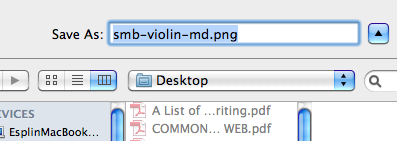
Choose "Save Page As..." Then, because there are soooooo many images on Clker you are going to want to delete some of the extra numbers and words that are attached to it. I always choose to save the images to my desktop because I am lazy and don't want to have to find them later.


 You now have some new clip art to insert into your document. Enjoy!


Thursday, March 22, 2012

Chick Life Cycle


This week we have been studying about life cycles.  We have been fortunate enough to get some eggs and an incubator through the extension office of Utah State.  It has been very exciting.  We got twelve eggs and we had eleven of them hatch.  The kids thought it was the coolest thing ever...  I made a book that went along with our study of the life cycle of a chick.  Sorry it isn't to cutesy, but it went along perfectly as we watched the chicks hatch.  

Pin It button on image hover